Background
Caseload Reports is Amplio’s enhanced reporting feature that enables educators to easily generate, customize, and export session summaries and student progress data. The tool is organized into three tabs:
- Caseload Overview – Monitor student engagement at a glance.
- Session Summaries – Instantly generate session notes for Medicaid and IEP reporting.
- Progress Data – Track student growth over time and create progress reports in minutes, eliminating a major time drain for SLPs.
This article will review how to navigate the Session Summaries tab. For more information on the Caseload Overview and Progress Data within Amplio’s Caseload Reports, visit their Help Center articles.
Session Summaries
The Session Summaries tab of the Caseload Reports page allows educators to quickly compile session notes for Medicaid and compliance reporting. This interactive walk-through and the information below will review how to navigate the Session Summaries tab.
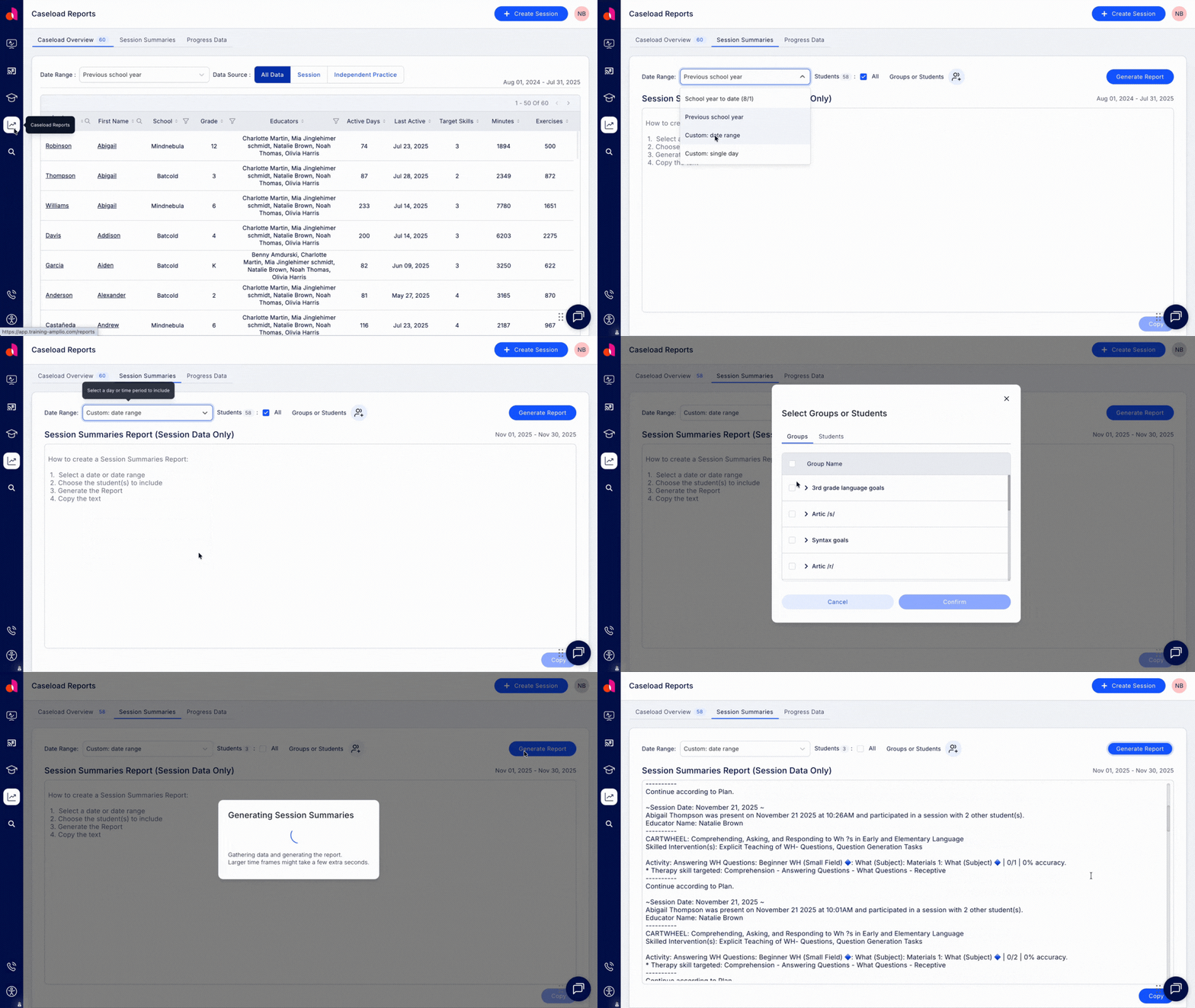
From the Home Page, click the Track Skills button to open the Caseload Reports page. Otherwise, click the Caseload Reports icon on the far left to open to the Caseload Reports page.
Then, click on the Session Summaries tab.
Set Your Date Range
Next, set your date range. To see session notes for a specific time period, click the date range dropdown menu to choose from:
- School year to date (starting from August 1)
- Previous school year (August 1 - July 31)
- A custom date range (up to 18 months)
- A single day
Choose Your Students
Next, choose which students to include.
Leave 'All' checked to pull session notes for all students assigned to you within the specified date range.
Click on the Groups or Students button to select individuals or groups of students. Once you’ve made your selection, click Confirm.
Generate Report
Click the Generate Report button and let Amplio do the heavy lifting!
The generated report is structured by student, followed by session dates – with session notes for all sessions within the selected date range listed under each student's name.
Click Copy to grab the full report, or highlight specific sections to copy and paste into a Medicaid billing system, an IEP system, or other documentation tools.