
The MTA Progress Report shows your student's progress within the different kits of the MTA curriculum. It highlights their current place in the scope and sequence, including which skills have been introduced and practiced so far.
If applicable, the report also includes scores from the reading and spelling mastery checks administered at the end of the kits.
Where to find the MTA Progress Report
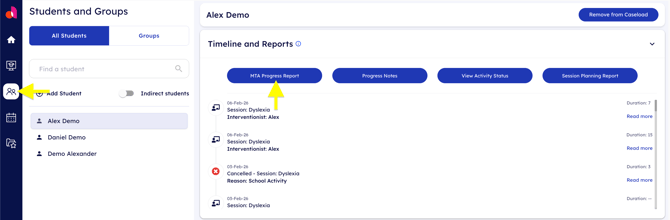
To print out the report for your student, navigate to the Students & Groups page and select the specific student from your list.
After selecting your student, scroll down the student's profile until you find the Timeline and Reports section.
Click on the blue MTA Progress Report button.
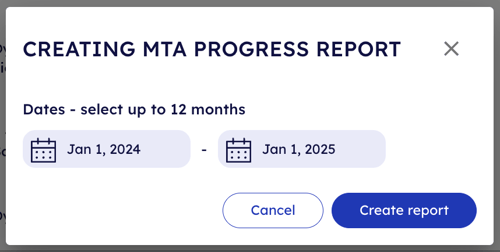
A new popup will appear that allows you to select the date range of the report. This report is limited to one year.
Once the date range has been selected, click the blue Create report button.
A new popup will appear with the generated report. You can view the report from this window, but to print it out, you must mark the checkbox agreeing consenting to downloading personally identifiable information of the student.
Once consented, the print icon will be enabled and allow you to print the generated report.
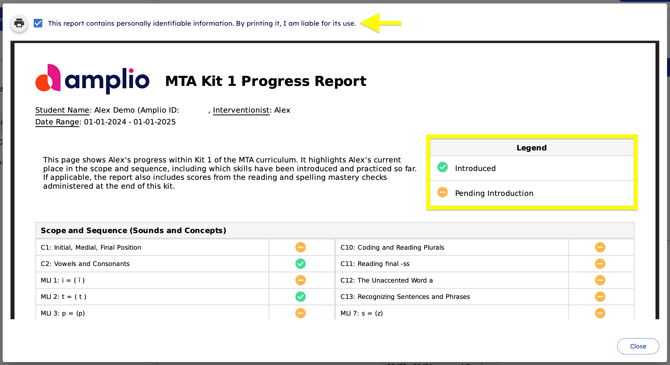
The legend shows which skills have been introduced to the student and which are still pending introduction.
Congratulations! You have successfully printed out the MTA Progress Report for your student.